

Download Stream TV – Free Global TV Streaming App for Windows, Mac, Android & iOS
Stream TV is a powerful and free utility software that brings global television programming directly to your computer and mobile devices. Developed by Streamtofile, this innovative tool allows users to watch live TV channels from over 100 countries, including popular networks from the US, UK, France, Japan, and more. With more than 1400+ channels available, Stream TV eliminates the need for cable subscriptions or traditional broadcast setups.
Whether you're at home, traveling, or simply want to explore international content, this software delivers high-definition streams with minimal buffering. The intuitive interface makes navigation easy, even for beginners, while advanced tuning features let you customize your viewing experience. Stream TV supports Full-Screen mode, remote control integration, and the ability to pause and resume live broadcasts—features typically found in premium streaming platforms.
The software is lightweight, secure, and regularly updated to ensure optimal performance and safety. Available for Windows, Mac, Android, and iOS, Stream TV is a must-have tool for anyone who loves TV without the limitations of geography or subscription fees.
Key Features of Stream TV – What Makes It Stand Out
Stream TV offers a rich set of features designed to enhance your live television experience across devices. One of the most impressive aspects is its extensive channel library—over 1400 live TV channels from more than 100 countries. This global reach allows users to explore cultural programming, news broadcasts, sports events, and entertainment shows from around the world, all in one place. Whether you're following a Premier League match from the UK or catching up on Japanese anime, Stream TV delivers real-time access without the need for satellite dishes or cable boxes.
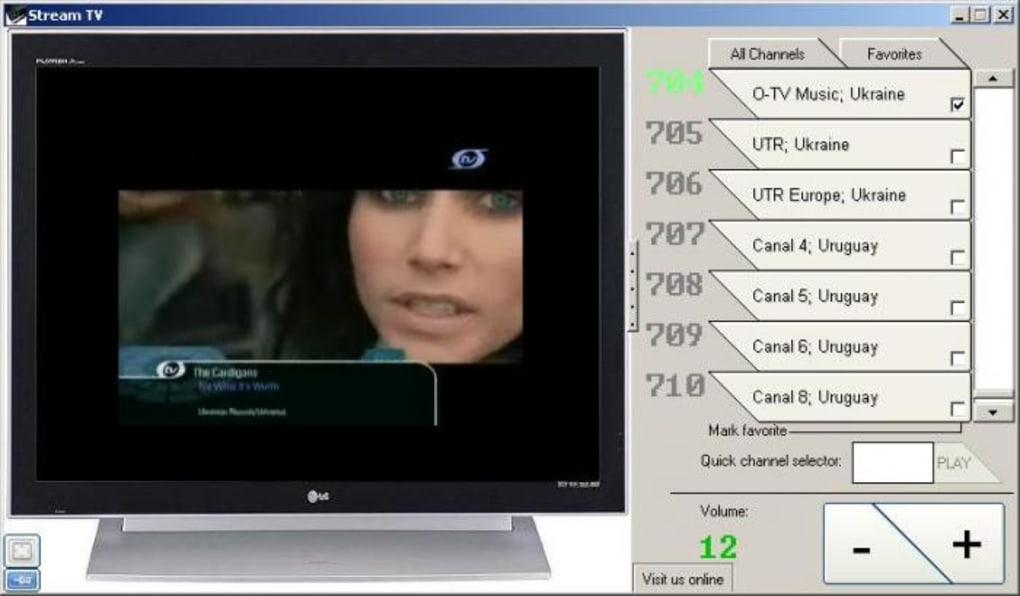
The software includes a user-friendly interface with powerful filtering tools. You can sort channels by country, genre, or language, making it simple to find exactly what you’re looking for. The built-in search function enables quick discovery of specific shows or networks. Additionally, Stream TV allows users to save favorite channels for one-click access, streamlining the viewing process. For those who prefer a more immersive experience, Full-Screen mode is available, while windowed mode lets you multitask without losing sight of your favorite program.
Another standout feature is the ability to pause and resume live TV, a rare capability in free streaming tools. This means you can step away for a few minutes without missing a moment. The software also supports remote control integration, allowing you to navigate menus and change channels wirelessly. Stream TV is compatible with Android and iOS devices, so you can watch live TV on smartphones and tablets. With regular updates, a lightweight design, and no malware risk, this tool is both reliable and future-ready.
How to Install & Use Stream TV on Your Devices
Downloading and installing Stream TV is a straightforward process, whether you're using Windows, Mac, Android, or iOS. Begin by visiting the official website of Streamtofile to download the latest version. The software is completely free to download and use, with no hidden subscription fees or in-app purchases. For Windows users, simply run the .exe installer file and follow the on-screen prompts. Mac users will need to download the .dmg file, open it, and drag the app into the Applications folder.
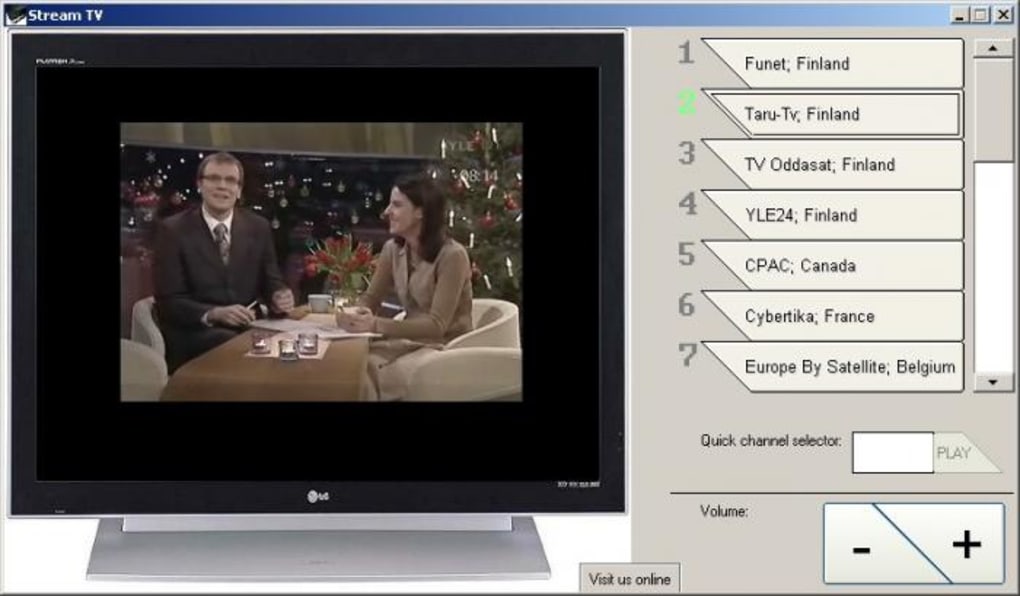
Once installed, launch the application. The main interface will load instantly, displaying a categorized list of channels. Use the search bar to find specific shows or browse by region.
To start watching, simply click on any channel. The video will begin streaming in HD quality, provided your internet connection is stable. You can switch to Full-Screen mode by clicking the dedicated button or using a keyboard shortcut.
If you want to pause the broadcast, click the pause button—this feature is particularly useful for live sports or breaking news.
For mobile users, download the Stream TV app from the Google Play Store or Apple App Store. After installation, open the app and sign in (if required). The mobile interface is optimized for touchscreens, with large buttons and smooth navigation.
You can also link your device to a compatible remote control for a TV-like experience. To save favorite channels, simply tap the heart icon next to the channel name. The app syncs your preferences across devices when logged in, ensuring a seamless experience no matter where you are.
Compatibility & System Requirements
Stream TV is designed to run smoothly on a wide range of devices and operating systems. It is officially supported on Windows 7 and later versions, including Windows 10 and Windows 11. For Mac users, the software works on macOS 10.14 (Mojave) and above, including Apple Silicon (M1/M2) Macs. This broad compatibility ensures that even older machines can handle the app without performance issues.
On mobile platforms, Stream TV is available for Android 6.0 and above, as well as iOS 12 and later. This makes it accessible to most modern smartphones and tablets. The software is lightweight, consuming minimal RAM and CPU resources, which means it won’t slow down your device even during extended viewing sessions. It also supports both Wi-Fi and mobile data connections, so you can stream live TV on the go.
For optimal performance, a stable internet connection with at least 5 Mbps download speed is recommended. While the app can function on slower connections, higher speeds ensure smoother playback and reduced buffering. The software automatically adjusts video quality based on your bandwidth, ensuring a consistent viewing experience. No additional hardware is required—just your computer or mobile device and an internet connection.
Pros & Cons of Stream TV – Honest Review
- Pros:
- Over 1400+ live TV channels from 100+ countries
- Free to download and use with no subscription fees
- Supports Windows, Mac, Android, and iOS devices
- Lightweight and low system resource usage
- Pause and resume live TV broadcasts
- Full-Screen and windowed viewing modes
- Remote control compatibility
- Regular software updates for security and performance
- Secure and free from malware or viruses
- Cons:
- Some channels may experience occasional buffering
- Not all channels are available in HD quality
- No built-in DVR or recording feature
- Interface could benefit from more customization options
- Occasional downtime on third-party stream sources
Frequently Asked Questions (FAQ)
Is Stream TV free to download and use?
Yes, Stream TV is completely free to download and use. There are no subscription fees, in-app purchases, or hidden charges. The software offers full access to its global channel library at no cost.
Can I watch Stream TV on my smartphone?
Absolutely! Stream TV is available for both Android and iOS devices. You can download the app from the Google Play Store or Apple App Store and enjoy live TV on your phone or tablet.
Does Stream TV work on older computers?
Yes, Stream TV is lightweight and optimized for older systems. It runs smoothly on machines with limited RAM and CPU power, making it ideal for users with legacy hardware.
Is Stream TV safe to use?
Yes, Stream TV is secure and free from malware. The software is developed by Streamtofile and regularly updated to ensure safety and performance. No personal data is collected during use.
Can I pause live TV on Stream TV?
Yes, one of the standout features of Stream TV is the ability to pause and resume live broadcasts. This allows you to take breaks without missing any content.
Final Verdict: Why Stream TV Is a Top Choice for Global TV Lovers
Stream TV is a standout free tool for anyone who wants to enjoy live television from around the world without the hassle of cable or satellite subscriptions. With over 1400 channels, cross-platform support, and a user-friendly design, it delivers a premium viewing experience at no cost. The ability to pause live TV, save favorites, and stream on mobile devices makes it incredibly versatile. While minor issues like occasional buffering or inconsistent HD quality exist, they are outweighed by the software’s strengths.
Whether you're a traveler missing home TV, a fan of international news, or someone who simply wants to explore global entertainment, Stream TV is a reliable and secure option. It’s lightweight, regularly updated, and safe to use. If you're looking for a free, powerful, and easy-to-use streaming app, Stream TV is definitely worth downloading today.
Ready to watch the world? Download Stream TV now and start exploring global TV programming instantly!







